
Walk into a well designed hardware store and you can find the paint aisle without asking. Signs hang over each section, related items sit side by side, and the busiest products are near the front. Walk into a badly designed one and you wander, give up, and leave. Search engine crawlers experience websites the same way.
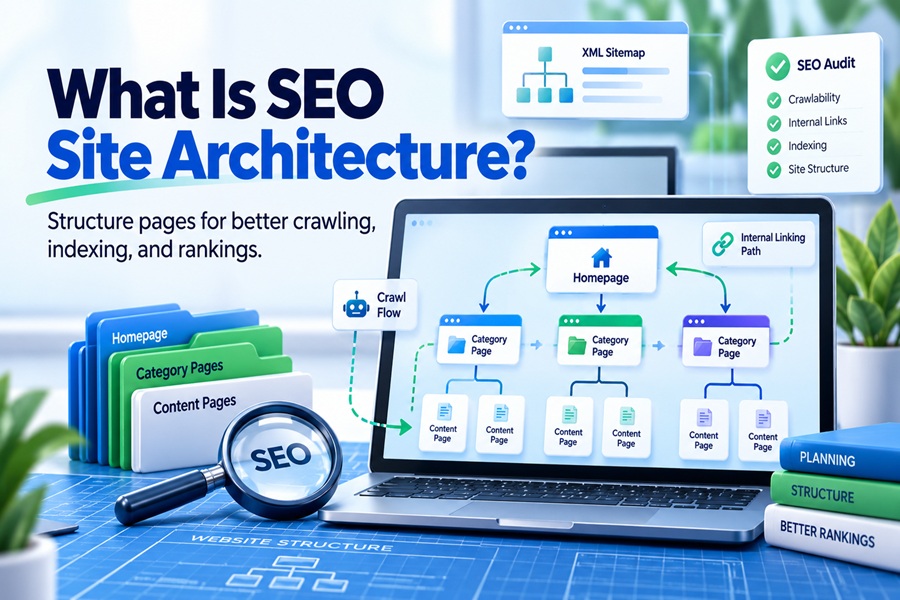
SEO site architecture is the way a website’s pages are organized, grouped and linked together so that both people and search engines can find, understand and value them. It covers the page hierarchy, navigation menus, URL patterns, internal links, breadcrumbs and sitemaps. Good architecture helps Google discover pages quickly, understand what each section is about, and pass authority from strong pages to the ones that need it most.
The parts that make up a site’s structure
Architecture is not one setting you switch on. It is several pieces working together.
Hierarchy. This is the logical grouping of content from broad to specific. A home services company might have a homepage, then service category pages such as plumbing and electrical, then individual service pages such as water heater repair.
Navigation. The main menu, footer and any sidebar menus. These links appear on every page, so they tell search engines which sections the site considers most important.
Internal links. The links inside your content that connect one page to another. These carry the most weight, because they come with context about why two pages relate.
URL structure. Readable paths like /plumbing/water-heater-repair help people understand where they are. More on how much Google cares about this below.
Breadcrumbs. The trail near the top of a page showing its place in the hierarchy. They add helpful links upward and can appear in search results.
XML sitemaps. A file listing the URLs you want indexed. A sitemap helps discovery, but it does not replace good linking. Pages that exist only in a sitemap and nowhere in your links tend to be crawled less and valued less.
Folders matter less than most people think
Many site owners spend weeks debating URL folders. Google’s John Mueller has addressed this directly. He has said Google does not care much about folder structure and instead focuses on internal linking, which he described as super critical for SEO.
That changes where effort should go. A page at /blog/2019/03/guides/water-heaters can perform perfectly well if strong pages link to it. A page at /water-heaters with almost no links pointing to it will struggle regardless of its tidy URL. Clean URLs are still worth having for users and for analytics, but rebuilding URLs and redirecting thousands of pages purely for structure rarely pays off.
The three click rule and what it gets wrong
Ask about site architecture and someone will mention the three click rule: every page should be reachable within three clicks of the homepage. There is real logic underneath it. Pages buried deep tend to be crawled less often and receive less internal authority, because authority thins out with each step away from the homepage.
But depth is mostly a stand in for internal link strength, not the cause of anything by itself. Several analyses of large sites have found no clean pattern between click depth alone and search impressions. A page six clicks deep that is linked from a strong hub page can outperform a page two clicks deep that is only linked from the footer.
Flattening a site blindly creates its own problems. Stuff two hundred links into a mega menu to make everything “close” to the homepage and you spread authority thin, confuse visitors, and blur the topical groupings that help Google understand what each section covers. The better goal is simple: important pages should be close to the homepage and well linked, and every page should be reachable through a sensible path.
Silos, clusters and the shapes sites take
Two models dominate how SEO people talk about structure.
Silos group content into separate sections and keep links mostly inside each section. Strict silos can make a site look tidy, but they block natural links between related topics and often trap authority inside one section.
Topic clusters group content around a pillar page that covers a broad subject, with supporting pages covering subtopics in depth. The pillar links to each supporting page, each supporting page links back, and supporting pages link to each other where it makes sense. Clusters can also link across to other clusters when topics overlap. This is the model most sites use now because it keeps groupings clear without walling them off.
The right shape also depends on what kind of site you run.
| Site type | Typical structure | Main architecture risk |
|---|---|---|
| Local service business | Home, service categories, individual services, location pages | Thin, near identical location pages |
| Ecommerce store | Home, categories, subcategories, products, filtered views | Faceted navigation creating endless crawlable URLs |
| Blog or publisher | Home, topic hubs, articles, author pages | Old articles orphaned as new ones push them down |
| SaaS company | Home, product, features, use cases, docs, blog | Docs and blog disconnected from product pages |
| Large directory | Home, regions, categories, listings | Millions of thin pages wasting crawl activity |
The filter problem on ecommerce sites
Faceted navigation deserves its own warning. Filters for size, color, price and brand can combine into millions of URLs that are mostly duplicates of each other. Crawlers can spend huge amounts of time on these combinations while important category and product pages wait.
Google’s Search Central documentation on faceted navigation offers clear options. If filtered pages do not need to rank, keep crawlers out of them, for example with robots.txt rules on the filter parameters or by not making them crawlable links. If certain filtered pages do deserve to rank, such as “women’s waterproof hiking boots,” give them a stable URL, unique content, and real internal links, and treat them as proper category pages.
Architecture now shapes AI answers too
Structure has picked up a newer job. Google’s AI Overviews and AI Mode, along with other AI search tools, pull passages from pages to build their answers, and AI retrieval crawlers often read only the raw HTML without running JavaScript.
That rewards a few architectural habits. Navigation and key internal links should exist in plain HTML, not only after scripts load. Each hub page should clearly define its topic and point to the detailed pages beneath it, so systems can follow the relationships. And within each page, headings should map to distinct questions, with each section answering its heading on its own. A well structured site is easier for a model to quote accurately.
Sketching your own structure
Start on paper, not in a CMS. List your core topics or product categories, ideally five to ten for a small site. Under each, list the specific pages that belong there. Mark which pages make money or capture leads. Those should sit no more than a couple of steps from the homepage and receive links from the strongest pages on the site.
Then check reality against the sketch. Crawl the site with a tool such as Screaming Frog and look at crawl depth, orphan pages with no internal links, and pages receiving the fewest inbound links. Compare that with Search Console to see which pages Google indexes and which it ignores. The gaps between the plan and the crawl show exactly where to add links, merge thin pages or remove dead ends.
A structure that grows without collapsing
Sites rarely fail at architecture on launch day. They fail slowly, as new pages get published without a home, old pages lose their links, and plugins add URLs nobody planned. The fix is a habit more than a project: every new page gets a clear parent, links from at least a few related pages, and a place in the sitemap. Treat SEO site architecture as the floor plan you keep maintaining, and both visitors and crawlers will keep finding the aisles that matter.